

Report page
When someone publishes a page on Plane and makes it publicly accessible, anyone who can view that page can report it if the content looks harmful, deceptive, or otherwise unsafe.
Reporting sends a flagged notice directly to Plane's support team, who review it and decide what action to take. You don't need a Plane account to file a report — if you can see the page, you can report it.
How to report a published page
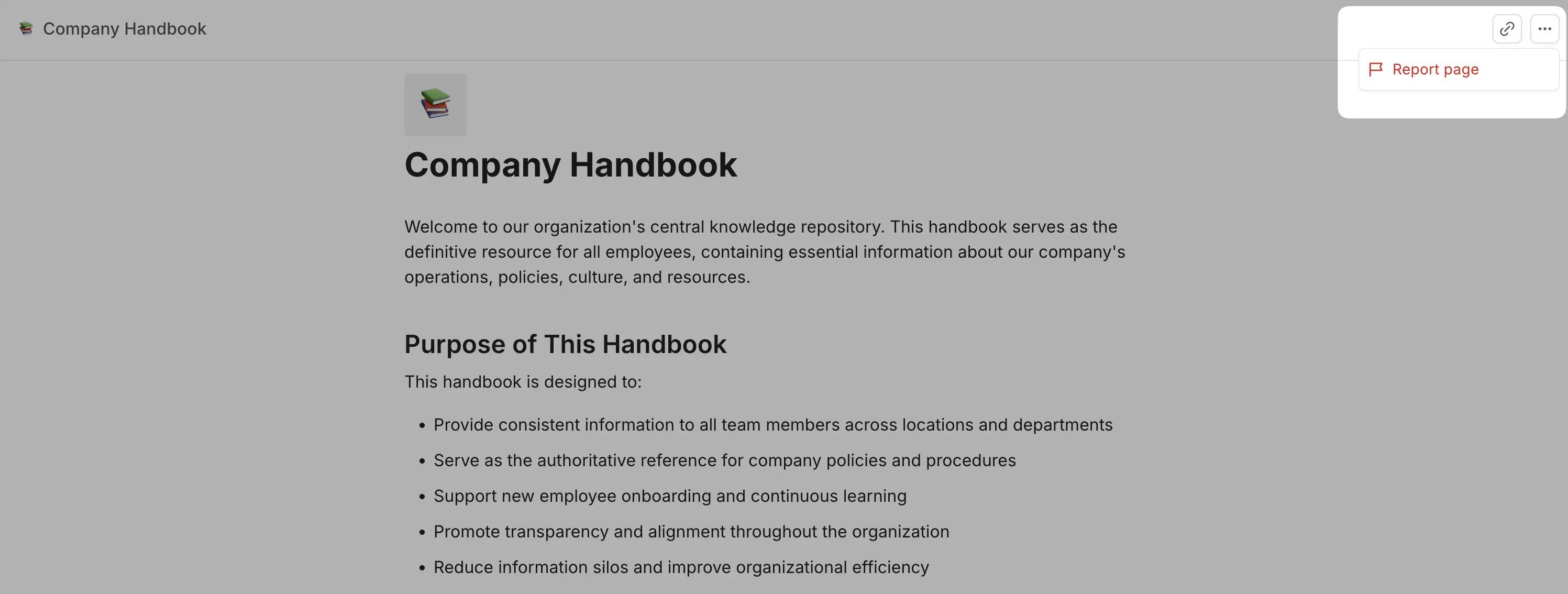
- Open the published page you want to report.
- Click the ... menu in the top-right corner of the page.
- Select Report page.
- In the dialog that opens, choose the reason that best describes the issue:
- Phishing or spam — misleading links, scams, or deceptive content designed to trick readers
- Inappropriate content — violent, explicit, or otherwise harmful material
- Copyright / DMCA takedown — content that infringes on intellectual property you own or represent
- Other violation — anything that doesn't fit the above; describe the issue in the text field
- Add a description to give Plane's team more context. This is required if you select Other violation.
- Click Report this page.
Your default email client will open with a pre-filled message to Plane's support team. Send the email to complete the report. The page link and your selected reason are already included — you don't need to add anything unless you want to.
Report by email
If you can't access the report option - for example, the page has already been taken down, or you're reporting on behalf of a security team - email security@plane.so with:
- The full URL of the page
- A short description of the issue
- Any supporting evidence: screenshots, email headers, originating IPs, or related URLs
What you should report
The following types of content and activity are not permitted on publicly published Plane pages.
Phishing and impersonation
Pages designed to impersonate other services, brands, or individuals, or to harvest credentials, payment details, or personal information under false pretences.Malware and malicious code
Hosting, distributing, or linking to malware, viruses, ransomware, or any code intended to harm users or systems.Illegal activity
Content that encourages, plans, or facilitates activity that breaks the law, or instructs others on how to do so.Harmful or graphic content
Sexually explicit material, graphic violence, content promoting self-harm, or anything else that endangers public safety.Child safety violations
Any content that exploits, abuses, endangers, or sexualizes minors.Harassment and threats
Bullying, threatening, or defaming individuals or groups.Hate speech and discrimination
Content that promotes violence or discrimination based on race, ethnicity, religion, gender, sexual orientation, disability, age, nationality, or any other protected characteristic.Fraud and scams
Fake giveaways, investment schemes, deceptive offers, or any content designed to defraud readers.Privacy violations
Publishing someone's personal or confidential information without their consent.Intellectual property infringement
Content that reproduces copyrighted material, trademarks, or other intellectual property without permission.Spam and deceptive practices
SEO manipulation, link farms, misleading redirects, or other deceptive distribution tactics.Disruption of Plane
Using Plane in ways that interfere with our service, infrastructure, or users.
This isn't an exhaustive list. If something feels wrong, report it.
What happens after you report
Reports are reviewed by our trust and safety team. Confirmed violations result in one or more of the following:
- The published page is disabled immediately.
- The workspace is suspended pending further investigation.
- The account is permanently terminated for severe or repeat violations.
We don't share the identity of the reporter with the person who published the page.