

Project Releases Business
A project release groups work items from one project into a deliverable. Use it to track what the project will ship together and write release notes, or use workspace releases for work across projects.
The two kinds of release share the same fields, statuses and flow. They differ in three ways:
- Scope. A project release can contain only work items from its own project. A workspace release can contain work items from any project you can see.
- Where it lives. Project releases are on the project's Releases page. Workspace releases are on the workspace Releases page in the sidebar.
- Who manages it. Project admins create and manage project releases, and workspace admins can too. Workspace admins manage workspace releases.
Turn on project releases
Project releases are off by default. You can enable them even if workspace releases are off.
- Open your project's menu and select Settings.
- Under Features, select Releases.
- Turn on Enable Releases.
If Releases is not listed under Features, project releases aren't available in your workspace. If the tab is there but the switch is disabled, you don't have permission to manage this project; ask a project admin to turn it on. Open the project and select Releases to see its releases.
Create a release
Project admins can create and manage project releases by default. Contributors can view them, and can add a work item to a release or remove it from one through the work item's Releases property.
Open the project's Releases page.
Click Add release.
Enter a name. The field placeholder reads "Release", and the name is required.
Optionally add a description and set Target date, Lead, Tag, and Label. A release takes one tag and any number of labels.
Click Create Release.
To edit these details later, open the release's menu, select Edit, and save with Update Release. You can also edit properties and the description on Overview.
Set up tags and labels
Open Project settings > Features > Releases to manage the project's tags and labels. These are separate from the workspace release catalogs.
For a version tag, open Release tags, click Add Tag, enter a version such as v2.3.0, and click Add. For a label, open Labels, click Add Label, enter a name, choose a color, and click Add.
Use a row's menu to edit or delete a tag or label. Save edits with Update. You can also drag labels to reorder them.
Add work items
A project release can contain only work items from its own project.
- Open the release and select Scope.
- Click Add work items.
- Search for and select the project's work items.
- Click Add selected work items.
A work item can belong to several releases. Adding it does not change its assignees or state.
You can also open a work item and select Releases under Project structure in its side panel. Select releases to add them or deselect them to remove the links. When both release features are enabled, the picker separates Project releases and Workspace releases.
Assign a release inline from list, board, and table layouts
You do not need to open the detail panel to assign a release. In any project view, you can update the Releases property directly on the work item row or card.
In list layout: Click the Releases property on the work item row. If the column is not visible, enable it from Display → Properties → Releases.
In table layout: Click the Releases cell in the work item row. The release picker opens inline. Add or remove releases without leaving the spreadsheet.
In board (kanban) layout: Click the Releases indicator on the work item card. If releases are not showing on cards, enable them from Display → Properties → Releases.
To remove an item from Scope, open its menu, select Remove from release, and confirm with Remove. The work item remains in its project.
TIP
A Release picker custom property records a separate reference. Use the built-in Releases property to include the work item in release scope.
You can also filter and sort work items by release in PQL, including matching by name with releaseMatch() and finding the next upcoming release with earliestUnreleasedRelease().
Release statuses
New releases start in Unreleased. Change the status on Overview or in the release's row on the Releases page as the release progresses:
| Status | When to use it |
|---|---|
| Unreleased | The release is being prepared. |
| Released | The release has shipped. |
| Cancelled | The release is no longer going ahead. |
Selecting Released on an unreleased release opens the same dialog as Release now.
Completing all work items does not change the release's status automatically. Cancelling a release preserves its scope and does not change the linked work items' states.
Ship a release
- Open an unreleased release and click Release now.
- If the release has unresolved work items, choose what happens to them. Transfer unresolved work items is selected by default. Use Select release to choose another unreleased release in the same project, or choose Ignore unresolved work items.
- Review or change the Target date.
- Click Release.
Unresolved work items are work items in the Backlog, Unstarted, or Started state groups. Transferring moves them out of this release and into the selected release. Completed and cancelled work items stay in the original release. Ignoring unresolved work items keeps them linked to the release as it ships. Neither option changes work item states.
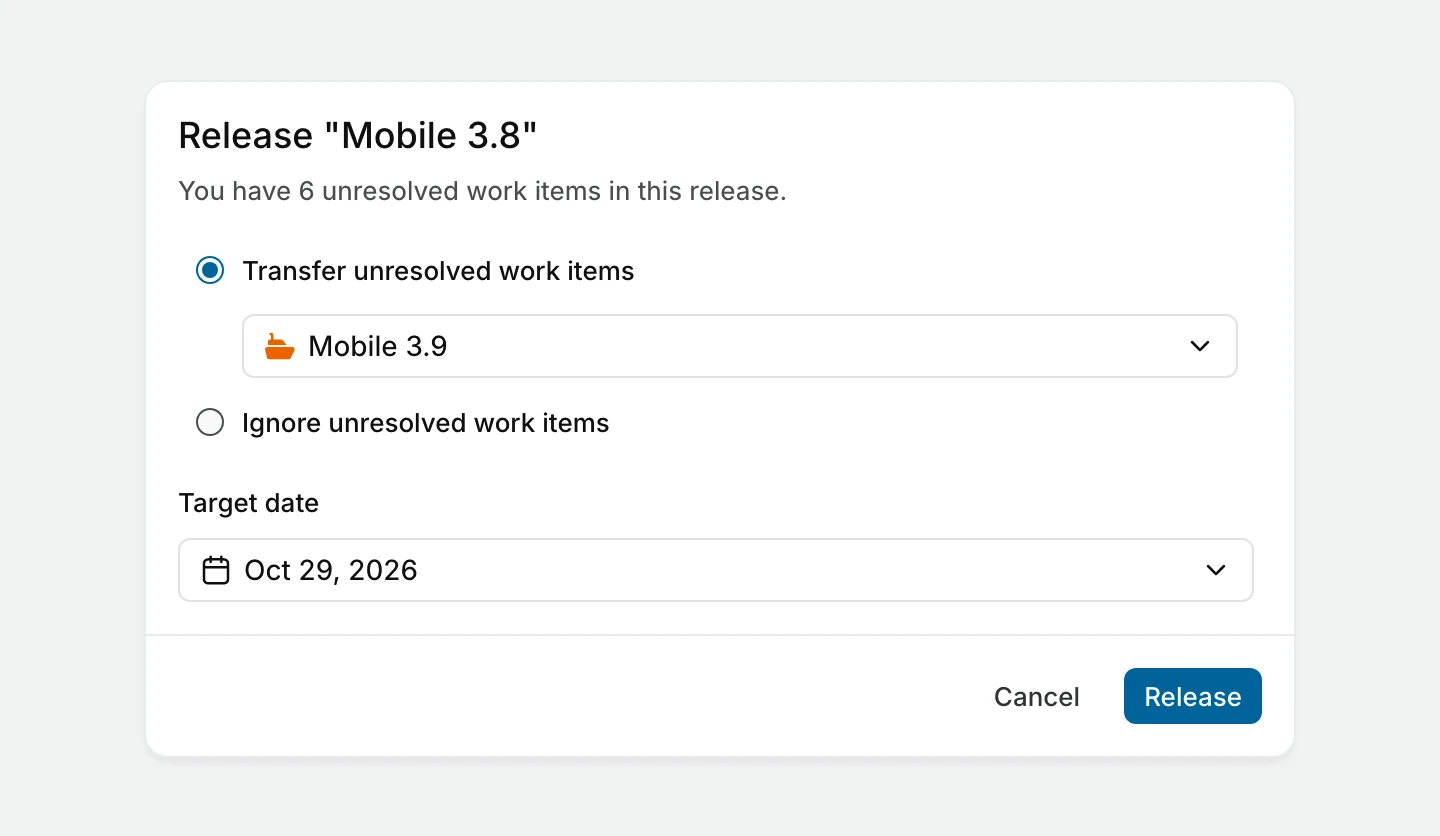
The selected date updates the target date in Properties on Overview.
Track progress
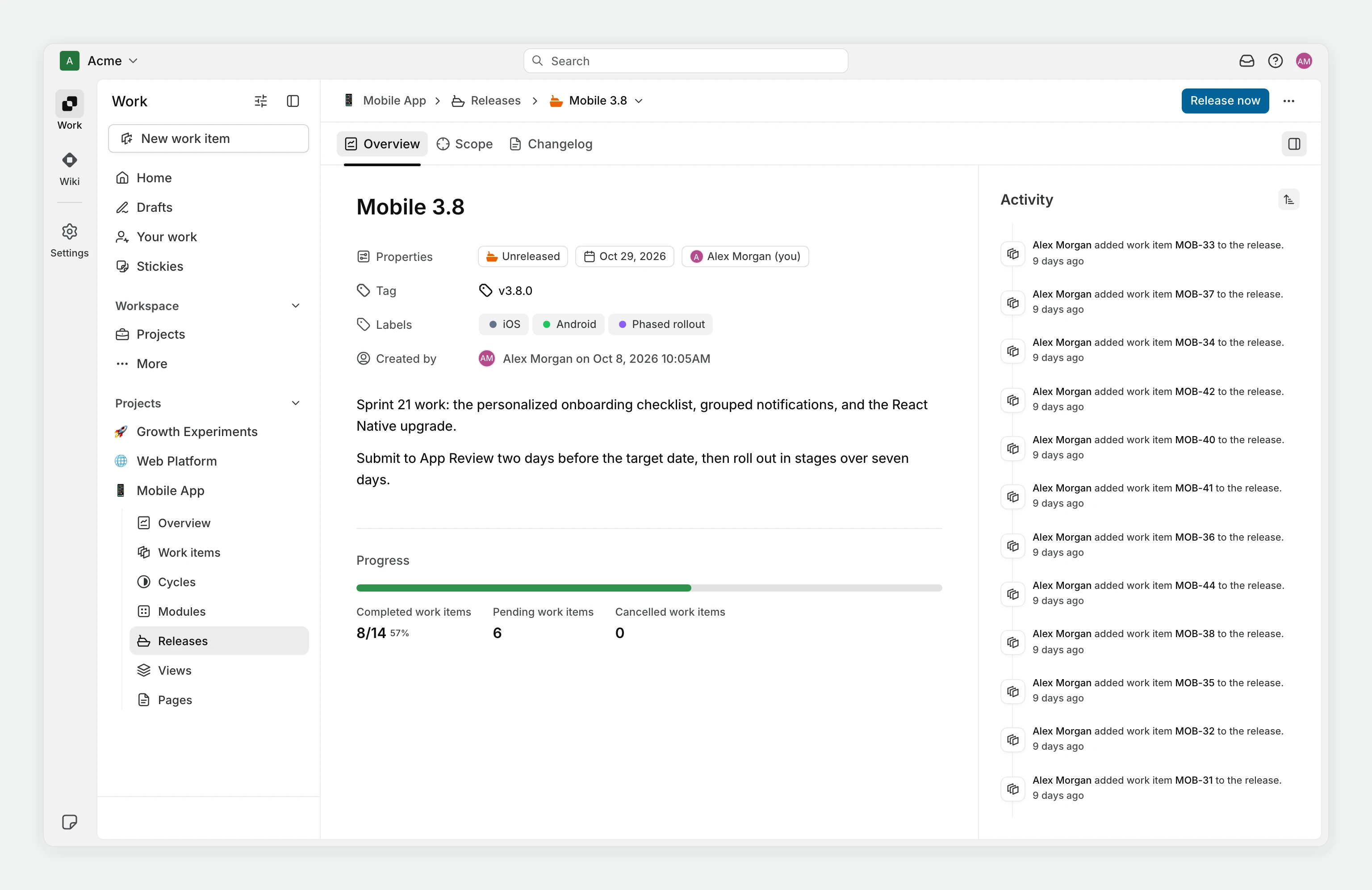
Open Overview to see the release's properties, description, and progress. Plane calculates progress from completed work items, excluding cancelled work items from the total. A release with only cancelled work items shows 0%. A release with no work items shows 0/0 without a percentage on Overview and 0% on the Releases page.
Review Activity in the side panel. To inspect the work behind the counts, use Scope and choose a list, board, calendar, table, or timeline layout.
View and find releases
The project's Releases page has Unreleased, Released, and Cancelled tabs. An empty tab says what belongs there, for example "Releases pending deployment will appear here." Before the project has any releases, the page reads "No releases yet" and "Group work items into releases to track what ships and when."
The release's Overview also lists Completed work items, Pending work items and Cancelled work items. Search by name or filter by Tags, Labels, Lead, or Target date. Sort by Created on, Name, or Release date, in ascending or descending order. Release date sorts by the date shown as Target date.
Write a changelog
Open Changelog to write the release notes in a rich text editor. Changes save automatically. You can update the changelog before or after the release ships, and people with access to the release can read it.
Delete a release
WARNING
Deleting a release cannot be undone. Its linked work items remain in the project.
- Open the project's Releases page.
- Open the release's menu and select Delete.
- Confirm the deletion.
See also
- Releases: the workspace-scoped version of this feature
- Permissions matrix: who can create, edit, and delete project releases
- Project settings